

Our £149 computer is a GeoPad 110, a Celeron equipped 10.1″ 2-in-1 laptop/tablet sporting the very latest Microsoft Windows 11. The device was purchased to see whether a cheap computer has any place on the amateur technologist’s desk, bench, or indeed shopping list. Is it a kid’s toy, or a device that you can purchase in confidence that you won’t have wasted your hard earned money.
Premature exit from the world of technology?
We nearly had to report this series of reviews was to be cut short. In the middle of May the device started to develop an intermittent fault with the display. It didn’t happen that often, but once it did the device needed a hard re-boot (switch off and on again using the power button, rather than a Start menu reboot) to rectify. The issue was narrowed down to only happening after the device had been asleep for a number of hours, such as overnight.
In all honesty, the device had not received much attention since the last report due to other commitments, so this was all the more annoying as usage hours were very low for such a fault to develop – it’s not like it had been taxed to within an inch of its life.
The fault manifested itself as a narrow 1cm band down the left hand of the screen that flickered on and off. At that point it required a reboot since as soon as you moved the mouse pointer, the whole screen went black and you couldn’t access the start menu to perform an orderly shutdown. So, whilst I don’t like doing this, I had to resort to a hard reboot by holding the power button down for a period of time. The device rebooted and the screen was fine and off we went again; until the next extended period of sleep.

It was an opportunity to test Geo’s Customer Services department and they were quickly on the case. I did see a report of another user having the same issue and complaining because support had asked him to reset the device back to factory; enabling them to determine if it was a hardware or software issue. I had no such issue, as I’d not got anything stored on it apart from all the apps that had been installed. The factory reset eradicated the issue and, even after it had been updated to the latest OS version and a couple of apps reinstalled, the fault has not reoccured. So clearly the fault was caused by an app I had installed, but as to which one it was I am yet to discover. I have resorted to installing apps on an as-required basis to give me a better chance of finding the culprit.
I suspect that some of the amateur radio applications I use are a bit old and are developed by hobby coders. This being Windows 11, and a little less tolerant of old and badly written apps, I do believe that one of these is to blame. This could be an issue if it turns out to be one of my favourite programs. But, that’s the risk we take with running hobby software on the very latest OS; you can’t maintain compatibility forever in to the dim and distant past.
GeoPad 110 supporting my other activities
The GeoPad has been used more recently and it has become my go-to device to take with me when I have to repair another computer, or install/update software. The one thing that has struck me is how useful it is to have a small device like this, with both USB-A and USB-C sockets on it. The more powerful, and accordingly expensive, Microsoft Surface Go 3 only features a single USB-C socket. When downloading software and burning it to a USB pen drive, I would be forced to use a more expensive dual-plug (USB-A/USB-C) pen drive with the Surface. On the Geo, I can use much cheaper single plug USB-A pen-drives to burn software images to for use on other computers quite easily. So a definite point in favour of the Geo.
Ports galore-ish
Well, I wouldn’t quite go that far, but comparing the Geo to Surface Go 3 from Microsoft, it certainly has ports on its side. Whilst both possess a headphone and USB-C socket, the Geo also features the aforementioned USB-A socket, and we’ve already discovered how useful this has proven to be above. However, in addition, it also boasts a micro-HDMI cable. Now that does require a slightly more costly cable to connect it to a monitor, or TV, but on the Surface Go 3 you would need to purchase a USB-C to HDMI dongle, or a small USB-C dock that contains an HDMI socket. You would also be able to compensate for the missing USB-A port with the small dock, but at a cost.
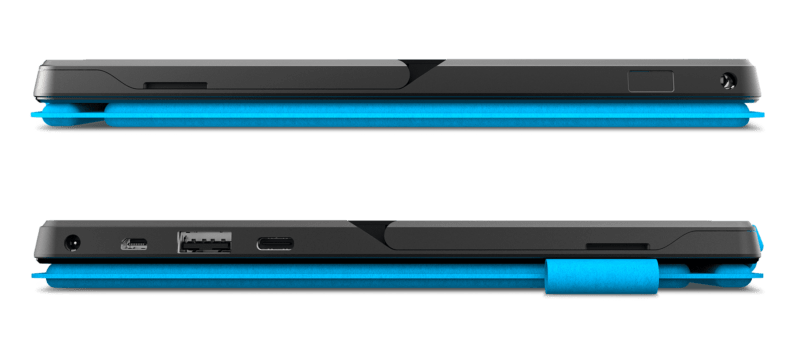
I haven’t used the VGA port yet, but it only really struck me as to how much the Geo has saved me; an essential mini dock would be an extra £30-50 extra. So another plus point for the GeoPad.
Conclusion
So far, the device is proving to be a useful add-on to my collection of computers. Obviously I’ve not finished putting it to all the uses I can yet, so there’s more to come. The keyboard is still the only thing that really portrays the device’s bargain basement price. It certainly looks like it could be a device that I would consider as a throw-away purchase. Let’s see if we can get it’s status to being that of a useful device that does things other devices can do costing much more; earning a rightful place in my arsenal.
But I’m not quite finished. You might wonder why I’m not damning the GeoPad to an eternal existence at a land-fill site due to the failed screen. Well that’s because I recently had cause to return a near-£1,000 laptop, from a very reputable and trusted international computer company, for its failure to do anything when switched on. A replacement was issued, but you can’t imagine the hassle it caused. Having spoken to the supplier, the device was crushed because it could not be repaired; they just couldn’t find the source of the issue.
So the moral is, no matter how much you spend on a computer it can fail – and in my personal experience it’s one-all in the cheap vs expensive computer reliability match.