


We announced a couple of weeks ago that we were going to look at a £149 computer. The principle reason was to determine whether it is actually usable in any way. Well, it’s arrived, and I thought it would be a good idea to share initial impressions of the GeoPad 110.
SPOILER ALERT: I wasn’t expecting much. In some areas I’ve been pleasantly supplied; in other areas, however, my expectations have been met.
£149 computer in the metal
First up was that I wasn’t expecting so much metal in the construction. The back plate is metal, but this might be for heat dissipation as it gets a little warm during operation. The supplied pen is also metal; plastic would have been an obvious choose when cutting costs.
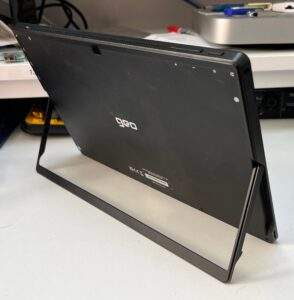
The device’s tilt stand is also metal. It’s probably just as well as it seems a little more flimsy than that of a Microsoft Surface Go. However, the stand is free to move to any position you like and stays put once in position.
My only slight gripe is that there are no rubber feet on the bottom of the stand. As a result, it’s metal against whatever surface the GeoPad is sitting on. This means that there’s nothing to stop the device sliding around if it used without the keyboard cover attached. With the keyboard cover attached the velvet like material it’s covered in presents decent resistance on the desktop surface to prevent it moving. Since the keyboard will be attached most of the time, it shouldn’t present too much of an issue.
Rarity value
One area were costs have definitely been cut are with the power delivery to the pen. Unlike more expensive alternative devices, there is no rechargeable battery contained within. In order to keep the pen nice an thin, and pleasing to hold, it is powered by a AAAA battery. Good luck getting a replacement in a hurry as nobody sells them around here. It’s probably best to order a spare now and keep it with the device.
Big bezels, but that’s positive

The bezel around the screen is quite large and does make the device look a little old fashioned. But then again, this is also a tablet and I actually like large bezels around tablets. Large bezels mean you can operate tablets without your fingers getting in the way. They prevent fingers from interacting with the touch screen and activating unwanted options on whatever app you are using.
Budget device = budget keyboard
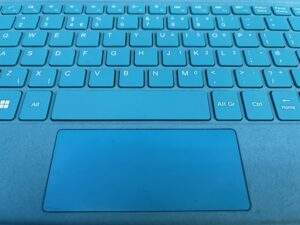
The biggest area of disappointment is the chicklet keyboard. The keys are small, close together and lack any kind of feel at all. You can almost feel the keys pivoting on what lies behind them. It’s not nice in any way. However, during my initial use of the keyboard I have not experienced any mistyping as a result of its construction or design. No keyboard bounce has been detected that causing missing letters and/or duplicate letters – the keyboard does work. It’s a lot better than some of the cheap computers I’ve used over the years for accuracy.
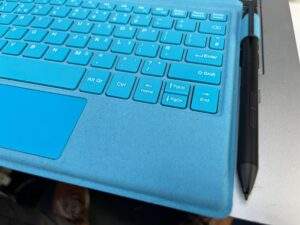
I wasn’t too impressed by the material that the keyboard is covered in either. It’s a velvet-like material, and I suspect that might get dirty rather quickly and be difficult to clean. In an attempt to make it attractive to young people, the keyboard comes in an ocean blue, or strawberry red. I’m not sure whether this blue variant is dirty, or the brush direction of the material makes it appear so. I’d need to see a brand new one to make up my mind.
Ready, get started, go!
Despite being brief, the printed Getting Started Guide was actually quite good. It is a model of simplicity, delivering exactly what the user needs, and nothing they don’t. Considering it’s a single tri-fold A4 sheet, it’s a good attempt. Most ‘manuals’ go straight in the bin these days – 5 pages repeated in ten different languages. So it’s a big well done here.
Nice screen for a £149 computer
The HD 1080 resolution screen is good to see on such a low-cost device. In such a small panel, the text and imagery are well formed with little, if any, pixelation to be seen. It’s nice and sharp, bright enough and the colours punchy and not washed out. I guess the glossy touch-panel in front of it helps, though it does suffer a bit of reflection. However, you can’t have everything at this price – it’s a nice display.
Power to the …
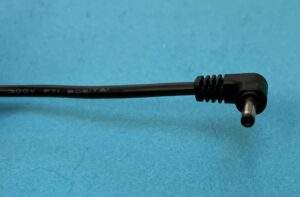
One more serious complaint involves the way that the device is charged. These days everyone is moving to the industry standard USB-C charging, as mandated. Clearly USB-C charging is more expensive to implement than the old-fashioned coaxial plug that you get with this device. The coaxial plug is also very thin, as necessitated by the relative thinness of the device. How abundant spare parts are, should the charger become unserviceable/lost, for t is unknown. Having said that, the power supply’s cable feels pretty sturdy and and the plug doesn’t feel like it’s going to part company with it any time soon.
£149 computer – does it pass muster?
So that’s the first impressions out of the way. I have to say that, keyboard aside, I feel this £149 computer is worth every single penny and more. The keyboard I will have to live with when mobile, though a separate Bluetooth one might be used at home.
Over the next few weeks the £149 computer will be put to the test in several different ways and environments. Watch out for the reports as to whether it was a wise buy, or is best avoided.